Our previous architecture post covered plugins, action guards, and the pipeline system. This one goes deeper into the translation engine, the part that makes Rasepi fundamentally different from every other docs platform.
Not the marketing pitch about translating paragraphs instead of pages. The actual code. How glossaries are resolved per tenant, how DeepL's style rules and custom instructions shape every translation, how content hashing drives stale detection, and how the orchestrator decides which blocks to retranslate.
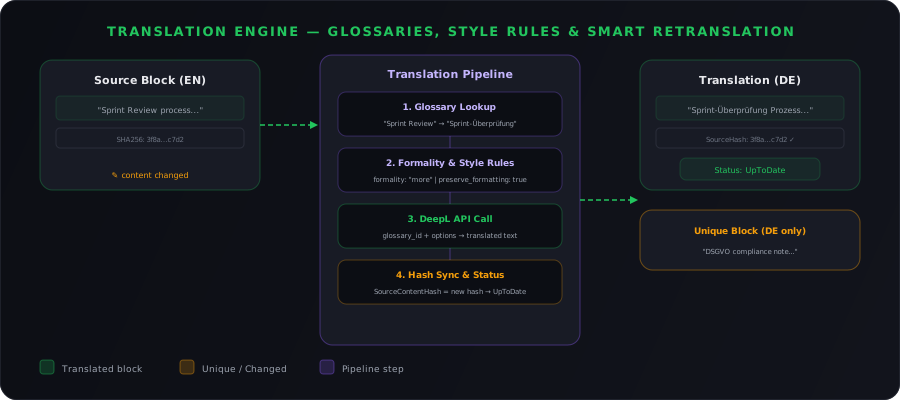
The translation pipeline
When a user saves a document, the system doesn't just retranslate everything. It runs a pretty specific sequence:
- Parse the TipTap JSON into individual blocks
- Compare content hashes to detect which blocks actually changed
- For changed blocks, resolve the tenant's glossary and style rule list for the language pair
- Apply style rules, custom instructions, and formality from tenant configuration
- Send only changed blocks to DeepL
- Update translation blocks and sync content hashes
Each step is its own service with its own interface. That matters because any step can be swapped out for something else, a different translation provider, a different hashing algorithm, a different glossary source.
Glossary resolution: tenant-scoped, DeepL-synced
DeepL glossaries have a constraint most people don't know about: they are immutable. You can't edit a DeepL glossary. Any change means deleting the old one and creating a new one.
Rasepi handles this by treating the database as the source of truth and DeepL glossaries as throwaway runtime artifacts. The TenantGlossary entity stores everything locally:
public class TenantGlossary : ITenantScoped
{
    public Guid Id { get; set; }
    public Guid TenantId { get; set; }
    public string Name { get; set; }
    public string SourceLanguage { get; set; }     // e.g. "en"
    public string TargetLanguage { get; set; }     // e.g. "de"
    public string? DeepLGlossaryId { get; set; }   // Runtime DeepL ID
    public DateTime? LastSyncedAt { get; set; }
    public bool IsDirty { get; set; } = true;      // Triggers re-sync
    public ICollection<TenantGlossaryEntry> Entries { get; set; }
}
When a user adds a glossary entry, say mapping "Sprint Review" to "Sprint-Überprüfung" for EN→DE, the database record updates immediately and IsDirty gets set to true. The DeepL glossary isn't recreated right then. It gets recreated lazily, the next time a translation actually needs it.
The sync flow
Before every translation call, the system resolves the glossary:
public async Task<string?> GetOrSyncDeepLGlossaryIdAsync(
    string sourceLanguage, string targetLanguage,
    CancellationToken ct = default)
{
    var glossary = await _db.TenantGlossaries
        .Include(g => g.Entries)
        .FirstOrDefaultAsync(g =>
            g.SourceLanguage == sourceLanguage &&
            g.TargetLanguage == targetLanguage, ct);

    if (glossary is null || glossary.Entries.Count == 0)
        return null;

    if (!glossary.IsDirty && glossary.DeepLGlossaryId is not null)
        return glossary.DeepLGlossaryId;

    // Dirty - delete old, create new
    if (glossary.DeepLGlossaryId is not null)
        await _deepL.DeleteGlossaryAsync(glossary.DeepLGlossaryId);

    var entries = glossary.Entries
        .ToDictionary(e => e.SourceTerm, e => e.TargetTerm);

    var deepLGlossary = await _deepL.CreateGlossaryAsync(
        $"rasepi-{glossary.Id}",
        glossary.SourceLanguage,
        glossary.TargetLanguage,
        entries);

    glossary.DeepLGlossaryId = deepLGlossary.GlossaryId;
    glossary.IsDirty = false;
    glossary.LastSyncedAt = DateTime.UtcNow;
    await _db.SaveChangesAsync(ct);

    return glossary.DeepLGlossaryId;
}
Three things worth noting here:
- Lazy sync. We only hit the DeepL API when a translation is actually needed. Editing glossary entries in bulk doesn't trigger dozens of API calls.
- Tenant isolation. The query runs through EF global query filters, so
TenantGlossariesis automatically scoped. Tenant A's glossary entries never leak into Tenant B's translations. - One glossary per language pair. DeepL enforces this anyway. One EN→DE glossary, one EN→FR glossary, and so on. The
(SourceLanguage, TargetLanguage)pair is unique per tenant.
Glossary entries
Individual entries are just term mappings:
public class TenantGlossaryEntry
{
    public Guid Id { get; set; }
    public Guid GlossaryId { get; set; }
    public string SourceTerm { get; set; }   // e.g. "Sprint Review"
    public string TargetTerm { get; set; }   // e.g. "Sprint-Überprüfung"
}
The API gives you full CRUD plus CSV import/export for bulk management:
POST   /api/admin/glossaries                       Create glossary
POST   /api/admin/glossaries/{id}/entries           Add term
PUT    /api/admin/glossaries/{id}/entries/{entryId}  Update term
DELETE /api/admin/glossaries/{id}/entries/{entryId}  Remove term
POST   /api/admin/glossaries/{id}/import            Import CSV
GET    /api/admin/glossaries/{id}/export            Export CSV
POST   /api/admin/glossaries/{id}/sync              Force DeepL sync
CSV import is super useful for teams migrating from existing translation memory systems. Export your terms, clean them up, import into Rasepi, and the next translation run uses the new glossary automatically.
Style rules, custom instructions, and formality
Glossaries handle terminology. But terminology is only half of it. A translation can use all the right words and still sound wrong. Wrong tone, wrong date format, wrong punctuation conventions.
DeepL's Style Rules API (v3) solves this. You can create reusable style rule lists that combine two types of controls:
- Configured rules, predefined formatting conventions for dates, times, punctuation, numbers, and more
- Custom instructions, free-text directives that shape tone, phrasing, and domain-specific conventions
Rasepi creates and manages these per tenant, per target language. The TenantStyleRuleList entity stores the DeepL style_id alongside the tenant's configured rules and custom instructions:
public class TenantStyleRuleList : ITenantScoped
{
    public Guid Id { get; set; }
    public Guid TenantId { get; set; }
    public string Name { get; set; }
    public string TargetLanguage { get; set; }      // e.g. "de"
    public string? DeepLStyleId { get; set; }       // Runtime DeepL style_id
    public string ConfiguredRulesJson { get; set; }  // Serialized configured rules
    public bool IsDirty { get; set; } = true;
    public DateTime? LastSyncedAt { get; set; }
    public ICollection<TenantCustomInstruction> CustomInstructions { get; set; }
}
Creating style rule lists
When an admin sets up translation rules for German, Rasepi calls DeepL's v3 API to create the style rule list. Here's what that looks like:
public async Task<string> CreateOrSyncStyleRuleListAsync(
    TenantStyleRuleList ruleList, CancellationToken ct = default)
{
    if (!ruleList.IsDirty && ruleList.DeepLStyleId is not null)
        return ruleList.DeepLStyleId;

    // DeepL style rule lists are mutable - we can update in place
    if (ruleList.DeepLStyleId is not null)
    {
        // Replace configured rules on existing list
        await _httpClient.PutAsJsonAsync(
            $"v3/style_rules/{ruleList.DeepLStyleId}/configured_rules",
            JsonSerializer.Deserialize<JsonElement>(ruleList.ConfiguredRulesJson),
            ct);

        // Sync custom instructions
        await SyncCustomInstructionsAsync(ruleList, ct);

        ruleList.IsDirty = false;
        ruleList.LastSyncedAt = DateTime.UtcNow;
        return ruleList.DeepLStyleId;
    }

    // Create new style rule list
    var payload = new
    {
        name = $"rasepi-{ruleList.TenantId}-{ruleList.TargetLanguage}",
        language = ruleList.TargetLanguage,
        configured_rules = JsonSerializer.Deserialize<JsonElement>(
            ruleList.ConfiguredRulesJson),
        custom_instructions = ruleList.CustomInstructions.Select(ci => new
        {
            label = ci.Label,
            prompt = ci.Prompt,
            source_language = ci.SourceLanguage
        })
    };

    var response = await _httpClient.PostAsJsonAsync("v3/style_rules", payload, ct);
    var result = await response.Content.ReadFromJsonAsync<StyleRuleResponse>(ct);

    ruleList.DeepLStyleId = result.StyleId;
    ruleList.IsDirty = false;
    ruleList.LastSyncedAt = DateTime.UtcNow;
    await _db.SaveChangesAsync(ct);

    return ruleList.DeepLStyleId;
}
Unlike glossaries, DeepL style rule lists are mutable. You can replace configured rules in place with PUT /v3/style_rules/{style_id}/configured_rules, and custom instructions can be individually added, updated, or deleted. Much friendlier for iterative refinement.
What configured rules look like
Configured rules cover formatting conventions that vary by language or company preference. Things like:
{
  "dates_and_times": {
    "time_format": "use_24_hour_clock",
    "calendar_era": "use_bc_and_ad"
  },
  "punctuation": {
    "periods_in_academic_degrees": "do_not_use"
  },
  "numbers": {
    "decimal_separator": "use_comma"
  }
}
These sound trivial, but they compound fast. A German document that uses AM/PM time format and period-separated decimals just reads as "translated from English" to a German reader. Setting use_24_hour_clock and use_comma for decimal separators across all German translations eliminates that immediately.
Custom instructions: this is the real power
Custom instructions are free-text directives, up to 200 per style rule list, each up to 300 characters. You basically tell DeepL how to shape the translation in plain language:
public class TenantCustomInstruction
{
    public Guid Id { get; set; }
    public Guid StyleRuleListId { get; set; }
    public string Label { get; set; }              // e.g. "Tone instruction"
    public string Prompt { get; set; }             // e.g. "Use a friendly, diplomatic tone"
    public string? SourceLanguage { get; set; }    // Optional source lang filter
}
Real examples from our tenants:
"Use a friendly, diplomatic tone"for a startup that wants approachable docs"Always use 'Sie' form, never 'du'"for a German law firm"Translate 'deployment' as 'Bereitstellung', never 'Deployment'"for terms that need context-dependent handling beyond simple glossary mapping"Use British English spelling (colour, organisation, licence)"for UK-based companies translating between English variants"Put currency symbols after the numeric amount"to match European conventions
Custom instructions are really powerful for domain-specific conventions that don't fit in glossary entries. A glossary maps one term to another. A custom instruction can say "when translating API docs, use imperative mood instead of passive voice." That's a completely different kind of control.
Formality
DeepL's formality parameter (default, more, less, prefer_more, prefer_less) is still available as a separate control alongside style rules. German "du" versus "Sie", French "tu" versus "vous", Japanese politeness levels. These are set per tenant language through TenantLanguageConfig:
public class TenantLanguageConfig : ITenantScoped
{
    public string LanguageCode { get; set; }
    public string DisplayName { get; set; }
    public bool IsEnabled { get; set; }
    public TranslationTrigger Trigger { get; set; }
    public string? Formality { get; set; }         // "more", "less", "prefer_more", etc.
    public string? StyleRuleListId { get; set; }   // Links to TenantStyleRuleList
    public string? TranslationProvider { get; set; }
    public int SortOrder { get; set; }
    public bool IsDefault { get; set; }
}
Formality, style rules, and glossaries all compose. A single translation call can carry all three:
var glossaryId = await GetOrSyncDeepLGlossaryIdAsync(sourceLang, targetLang, ct);
var styleId = await GetOrSyncStyleRuleListAsync(targetLang, ct);
var formality = tenantLanguageConfig.Formality ?? "default";

// Build the v2/translate request payload
var payload = new
{
    text = new[] { blockContent },
    source_lang = NormalizeLanguageCode(sourceLang),
    target_lang = NormalizeLanguageCode(targetLang),
    glossary_id = glossaryId,
    style_id = styleId,
    formality = formality,
    preserve_formatting = true,
    context = surroundingContext,  // Adjacent blocks, not billed
    model_type = "quality_optimized"
};
Two things worth noting here:
- The
contextparameter. We pass adjacent blocks as context to improve translation quality. DeepL uses this to resolve ambiguity but doesn't translate or bill for it. A paragraph about "cells" translates differently when the surrounding context is a biology document versus a spreadsheet manual. - Model selection. Any request with
style_idorcustom_instructionsautomatically uses DeepL'squality_optimizedmodel. This is the highest quality tier. You can't combine these withlatency_optimized, and that's a deliberate constraint by DeepL. Style customisation needs the full model.
Why this matters more than you'd think
Picture a company writing internal docs in German with informal "du" that suddenly switches to formal "Sie" in a translated section. Looks inconsistent at best, unprofessional at worst. Formality handles that. But formality alone won't catch a document that uses AM/PM timestamps when your German office uses 24-hour format, or that puts the currency symbol before the number instead of after.
All of these layered together (style rules, custom instructions, formality, glossaries) produce translations that read like someone on your team wrote them. Not like output from a machine that doesn't know your company exists.
The DeepL service layer
All DeepL communication goes through IDeepLService. It wraps the official DeepL .NET SDK and handles v3 API calls for style rules:
public interface IDeepLService
{
    // Text translation (v2)
    Task<TextResult> TranslateTextAsync(
        string text, string sourceLanguage, string targetLanguage,
        string? options = null);

    Task<TextResult[]> TranslateTextBatchAsync(
        IEnumerable<string> texts, string sourceLanguage,
        string targetLanguage, string? options = null);

    // Glossary management (v2)
    Task<GlossaryInfo> CreateGlossaryAsync(
        string name, string sourceLang, string targetLang,
        Dictionary<string, string> entries);
    Task DeleteGlossaryAsync(string glossaryId);
    Task<GlossaryInfo> GetGlossaryAsync(string glossaryId);
    Task<GlossaryInfo[]> ListGlossariesAsync();
    Task<Dictionary<string, string>> GetGlossaryEntriesAsync(
        string glossaryId);

    // Style rules (v3)
    Task<StyleRuleResponse> CreateStyleRuleListAsync(
        string name, string language,
        JsonElement configuredRules,
        IEnumerable<CustomInstructionRequest> customInstructions);
    Task ReplaceConfiguredRulesAsync(
        string styleId, JsonElement configuredRules);
    Task<CustomInstructionResponse> AddCustomInstructionAsync(
        string styleId, string label, string prompt,
        string? sourceLanguage = null);
    Task DeleteCustomInstructionAsync(
        string styleId, string instructionId);
    Task DeleteStyleRuleListAsync(string styleId);

    // Usage tracking
    Task<Usage> GetUsageAsync();
    Task<Language[]> GetSourceLanguagesAsync();
    Task<Language[]> GetTargetLanguagesAsync();
}
The implementation handles language code normalisation. DeepL requires EN-US or EN-GB instead of bare en, and PT-PT or PT-BR instead of pt:
private static string NormalizeLanguageCode(string code)
    => code.ToLower() switch
    {
        "en" => "EN-US",
        "pt" => "PT-PT",
        _ => code.ToUpper()
    };
Batch translation uses 50-item chunking to stay within DeepL's API limits while maximising throughput:
public async Task<TranslationBatchResult> TranslateBatchAsync(
    Dictionary<string, string> texts,
    string sourceLanguage, string targetLanguage)
{
    var translations = new Dictionary<string, string>();
    long totalChars = 0;

    foreach (var chunk in texts.Chunk(50))
    {
        var results = await _deepL.TranslateTextBatchAsync(
            chunk.Select(kv => kv.Value),
            sourceLanguage, targetLanguage);

        for (int i = 0; i < chunk.Length; i++)
        {
            translations[chunk[i].Key] = results[i].Text;
            totalChars += chunk[i].Value.Length;
        }
    }

    return new TranslationBatchResult
    {
        Translations = translations,
        BilledCharacters = totalChars
    };
}
Because we only send stale blocks, not entire documents, a typical translation batch for a single edit contains 1-3 blocks instead of 40+. That's where the 94% cost reduction comes from.
The translation orchestrator
The TranslationOrchestrator decides what to do with each block when the source document changes. Let's walk through the decision tree:
public async Task OrchestrateTranslationAsync(
    Guid entryId, List<Guid> changedBlockIds,
    CancellationToken ct = default)
{
    var entry = await _db.Entries
        .FirstOrDefaultAsync(e => e.Id == entryId, ct);

    var translations = await _db.EntryTranslations
        .Where(t => t.EntryId == entryId)
        .ToListAsync(ct);

    foreach (var translation in translations)
    {
        var langConfig = await GetLanguageConfigAsync(
            translation.Language, ct);

        var translationBlocks = await _db.TranslationBlocks
            .Where(tb => changedBlockIds.Contains(tb.SourceBlockId)
                      && tb.Language == translation.Language)
            .ToListAsync(ct);

        foreach (var block in translationBlocks)
        {
            if (block.IsLocked || block.TranslatedById is not null)
            {
                // Human-edited or locked - mark stale, don't overwrite
                block.Status = TranslationStatus.Stale;
            }
            else if (langConfig.Trigger == TranslationTrigger.AlwaysTranslate)
            {
                // Machine-translated, auto mode - retranslate now
                await RetranslateBlockAsync(block, translation.Language, ct);
            }
            else
            {
                // TranslateOnFirstVisit - mark stale, translate later
                block.Status = TranslationStatus.Stale;
            }
        }
    }

    await _db.SaveChangesAsync(ct);
}
The key bit: human-edited blocks are never automatically overwritten. If a translator manually adjusted a block, maybe adding cultural context or rewording for clarity, the system respects that work. It marks the block as stale so the translator knows the source changed, but it won't silently replace their edits.
Machine-translated blocks with AlwaysTranslate enabled are retranslated immediately. Machine-translated blocks with TranslateOnFirstVisit are marked stale and translated when someone actually opens the document in that language.
Translation triggers: when translations happen
Each language has a TranslationTrigger that controls timing:
public enum TranslationTrigger
{
    AlwaysTranslate,         // Translate on every save
    TranslateOnFirstVisit    // Translate when first opened in that language
}
AlwaysTranslate is useful for high-priority languages where you want translations to be immediately current. French for a company with a large Paris office. German for a company with headquarters in Munich.
TranslateOnFirstVisit is useful for languages that are occasionally needed but not worth the API cost of keeping perfectly current at all times. When someone opens the document in that language, stale blocks are translated on the fly.
Both modes use the same glossary resolution, the same formality settings, and the same content hashing. The only difference is timing.
Unique content and structure adaptation
This is where the architecture really pays off beyond just translation.
When a German translator adds a DSGVO compliance section that doesn't exist in English, they add it as a new block in the German version. That block has no SourceBlockId, it's flagged as unique content. The system never sends it for retranslation because there's no source to translate from. It only exists in German.
When a Japanese translator changes a bullet list to a numbered list (a common convention in Japanese technical writing), the block's IsStructureAdapted flag preserves this across future retranslation cycles:
var translation = new TranslationBlock
{
    SourceBlockId = sourceBlockId,
    Language = targetLanguage,
    BlockType = translatedBlockType,
    SourceBlockType = sourceBlock.BlockType,
    IsStructureAdapted = translatedBlockType != sourceBlock.BlockType,
    StructureAdaptationNotes = "Numbered list preferred in JP technical docs",
    SourceContentHash = sourceBlock.ContentHash,
    Status = TranslationStatus.UpToDate,
};
The IsNoTranslate flag handles content that should be copied verbatim: code blocks, URLs, product names, mathematical notation. The translation provider skips these entirely.
Putting it all together
Let's walk through the full flow. A user in London edits a paragraph in the English source document, and your Munich office has German set to AlwaysTranslate:
- User saves. TipTap sends JSON to the API
- Block extraction.
CreateBlocksFromDocumentAsyncparses JSON, recalculates content hashes - Change detection. System compares old and new hashes, identifies the changed block
- Orchestrator runs. Finds the German
EntryTranslation, checks the German block - Block is machine-translated. Not locked, not human-edited → eligible for retranslation
- Glossary resolution.
GetOrSyncDeepLGlossaryIdAsync("en", "de")returns the glossary ID (syncs if dirty) - Style rule resolution.
GetOrSyncStyleRuleListAsync("de")returns the DeepLstyle_idwith configured formatting rules and custom instructions - Formality + context. Formality set to "more" (formal "Sie"), adjacent blocks passed as context for disambiguation, preserve formatting on
- DeepL call. Single block sent with glossary ID, style ID, formality, and context
- Block updated. Translated content stored,
SourceContentHashsynced, status set toUpToDate - Cost. One block translated instead of 40+. The remaining 39 blocks? Untouched.
Meanwhile, your Tokyo office has Japanese set to TranslateOnFirstVisit. The same edit marks the Japanese translation block as Stale. When someone in Tokyo opens the document, steps 5-9 happen on the fly. Their structure adaptation (numbered list) is preserved. Their unique blocks stay exactly where they are.
The translation engine is the part of Rasepi that delivers the most visible value. Translations that use your terminology, follow your formatting conventions, obey your custom instructions, match your tone, respect your translators' work, and cost a fraction of what full-document retranslation would. The architecture makes all of that automatic, and stays out of the way when humans want to take over.
The same DeepL engine that powers written translations also powers Talk to Docs, our conversational documentation interface, with DeepL Voice handling the spoken interaction. Same glossaries, same style rules, same formality, same consistency. Whether your team reads documentation or talks to it, the language quality is identical.