If you've ever run a document through Google Translate, or honestly any translation tool, you know the result. Technically correct. Tonally wrong. Your product is suddenly called something different. Your team's internal shorthand disappears. Formal "you" where your company uses informal, or the other way around.
The output is translated, but it doesn't sound like you.
That's what Rasepi's translation system was built to fix. Not "can we translate documentation" (every tool can do that now) but "can we translate it so it actually sounds like our team wrote it."
The answer is yes. And it doesn't require a team of professional translators to get there.
Only what changed gets translated
Most documentation platforms translate entire pages. You change one sentence and the whole document goes off for retranslation. Every language, every paragraph, whether it changed or not.
Rasepi works differently. It tracks every paragraph individually. When you edit one section of a 20-section document, only that one section gets retranslated. The other 19, across all languages, stay exactly as they were.
This means two things:
- Your translation costs drop dramatically. We're talking 94% less for typical edits. Most updates touch one or two sections, not the whole page.
- Translations you already reviewed stay stable. If your German team approved a translation last week, editing an unrelated paragraph in English won't touch their approved text.
The system knows what changed because every paragraph has a unique identity and a content fingerprint. When the fingerprint changes, that specific paragraph is flagged for retranslation. Nothing else.
Your glossary, your terminology
Here's where it gets interesting.
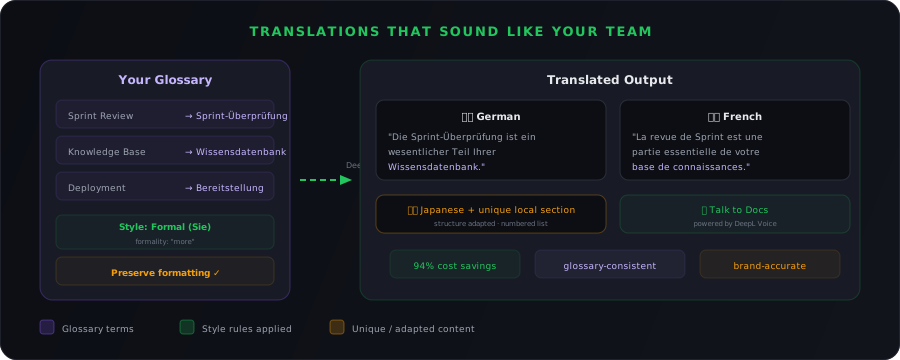
Every company has its own vocabulary. "Sprint Review" might stay as "Sprint Review" in your German docs because your Berlin team uses the English term. Or it might become "Sprint-Überprüfung" because your Munich team prefers the German version. "Knowledge Base" might be "Wissensdatenbank" or "Knowledge Base" or something entirely different your team coined internally.
Rasepi lets you build a glossary for each language. Basically a list of terms and their approved translations. When a paragraph is translated, the system checks your glossary first. Every term in your list gets translated exactly the way you defined it. Every time. Across every document.
You can manage your glossary directly in Rasepi:
- Add terms one by one as you notice inconsistencies
- Import a CSV if you already have a terminology list from another system
- Export your glossary to share with external translators or other tools
The glossary works per language pair. Your English-to-German glossary is separate from your English-to-French glossary. This matters because the same English term might need different treatment in different languages. "Sprint Review" might stay English in German but get translated in Japanese.
When you update your glossary, the change takes effect the next time any paragraph is translated into that language. No need to retranslate everything manually. The next natural edit cycle picks it up.
Style rules: making translations sound like you wrote them
Glossaries handle individual words. But a translation can use all the right terms and still feel off. Wrong tone. Dates in the wrong format. Numbers with the wrong separator. Currency symbols in the wrong place.
That's what style rules are for.
For each language, you can set up a collection of rules that control how translations are shaped:
Formatting conventions
These are the details that make a document feel native rather than "obviously translated from English":
- Date and time formats. 24-hour clock for German, AM/PM for English, and more
- Number formatting. Comma as decimal separator in German (3,14 instead of 3.14), period for thousands
- Punctuation rules. Academic degree formatting, quotation mark styles, and other regional conventions
You pick the conventions that match your company's standards. Rasepi applies them to every translation in that language, across every document.
Custom instructions
This is where things get really powerful. Custom instructions are plain-language directives that tell the translation engine how to handle your content. You write them in normal sentences, and the engine follows them.
Some examples:
- "Use a friendly, diplomatic tone" for a company that wants approachable documentation
- "Always use the formal 'Sie' form, never 'du'" for professional German communication
- "Use British English spelling: colour, organisation, licence" when your English-speaking audience is UK-based
- "Put currency symbols after the numeric amount" to match European conventions
- "When describing API endpoints, use imperative mood" for technical docs that should feel direct
You can add up to 200 custom instructions per language. They work alongside your glossary and formatting rules, and the translation engine considers all of them together on every translation.
Formality
German has "du" and "Sie." French has "tu" and "vous." Japanese has multiple levels of politeness. Even languages without obvious formal/informal pronouns have tonal differences that matter.
Rasepi lets you set the formality level for each language. Once configured, every translated paragraph matches that tone. If your company addresses readers formally in French ("vous") but informally in German ("du"), that's exactly what every translation will do.
It all works together
Here's what matters: glossary terms, formatting conventions, custom instructions, and formality settings all apply to every translation at the same time. You don't pick one or the other. You set them all up once, and every paragraph that gets translated goes through the same set of rules.
The result is translations that read like someone on your local team wrote them. Not like a machine that translated each sentence without knowing anything about your company.
Each language can have its own content
This is the feature that surprises people the most.
In Rasepi, a translated document isn't a locked copy of the original. Each language version can have content that only exists in that language.
Why does this matter?
Because different markets need different things:
- Your German documentation might need a DSGVO (GDPR) compliance section that doesn't apply to the US version
- Your Japanese team might need a note about local tooling nobody else uses
- Your Brazilian office might need context about regional tax regulations
In most translation tools, adding content to one language version means it gets overwritten the next time someone retranslates from English. Teams figure this out fast and stop adding local content. They create shadow docs in Notion or Slack or somewhere else, and now you have two systems that nobody fully trusts.
In Rasepi, unique content is flagged as belonging to that language. It's never overwritten by retranslation. It's never deleted when the English source changes. It lives alongside the translated content as a natural part of the document.
Same goes for structure. If your Japanese translators prefer numbered lists where the English version uses bullets (a common convention in Japanese technical writing), they can change the format. Rasepi preserves that choice across future updates.
Every language version is a first-class document, not a read-only mirror.
Automatic and human: they work together
Rasepi doesn't force you to choose between machine translation and human translation. It supports both, and it knows the difference.
When a paragraph is machine-translated and the source changes, Rasepi retranslates it automatically. No human intervention needed. The glossary and style rules keep things consistent.
When a paragraph has been manually edited by a human translator, maybe they rewrote it for cultural nuance or added context a machine wouldn't catch, Rasepi respects that work. If the source changes, the system flags the paragraph as needing review but never silently overwrites human edits. The translator sees what changed in the source and decides how to update their version.
This means your translation quality improves over time. Machine translation handles the bulk. Human translators focus on the paragraphs that need a human touch. And neither one steps on the other's work.
Two modes: always current or translate on demand
For each language, you choose when translations happen:
- Always translate. Every time someone saves the source document, changed paragraphs are retranslated immediately. Best for your most important languages where readers expect up-to-the-minute accuracy.
- Translate when viewed. Changed paragraphs are flagged but not translated until someone actually opens the document in that language. Great for languages that are used less frequently. No wasted translation costs on content nobody is reading.
Both modes use the same glossary, the same style rules, the same quality. The only difference is timing.
What this looks like in practice
Say you run a company with teams in London, Munich, Paris, and Tokyo. Your documentation is written in English.
A product manager in London updates the deployment guide. One section about a new CI/CD step.
Here's what happens:
- German (always translate). The changed section is retranslated within seconds. "Sprint Review" becomes "Sprint-Überprüfung" because that's in your glossary. Formal "Sie" because that's your formality setting. Dates in 24-hour format because that's your configured rule. The custom instruction "use a direct, imperative tone" shapes the phrasing. The DSGVO section the Munich team added? Untouched.
- French (always translate). Same section, retranslated immediately. "Vous" formality. French glossary terms applied. Currency symbols after the number per your custom instruction. The rest of the document stays exactly as the Paris office last reviewed it.
- Japanese (translate when viewed). The changed section is flagged as stale. When someone in Tokyo opens the document, it's translated on the fly. Their custom numbered-list formatting is preserved. Their local tooling note stays in place.
One edit. Three languages updated. Zero full-document retranslations. Consistent terminology, consistent tone, and respectful of every team's local additions.
Speaking of language quality
The translation engine behind all of this is DeepL, the same technology that powers Rasepi's Talk to Docs feature. You can speak to your documentation and get answers out loud. DeepL Voice handles the spoken interaction, which means the same terminology consistency, style rules, and language quality you get in written translations carries over to voice conversations too. Your glossary terms and custom instructions sound right whether your team is reading or listening.
Translations that sound like your team aren't a luxury. For companies operating across languages, they're the difference between documentation people trust and documentation people work around. Glossaries, style rules, custom instructions, smart retranslation, and per-language unique content make that possible. Automatically, from day one.
Your documentation should sound like your team in every language. Not like a machine. Not like a different company. Like you.